

Introducing Reply Tracking: Coach Replies, Right Inside ProductiveRecruit
Coach replies now land inside ProductiveRecruit, threaded into a conversation with everything you sent. See which coaches are waiting on you, and reply without leaving the app.

Colin McAtee
Founder
You sent forty emails to college coaches. Somewhere in your inbox, between a shipping notification and a group chat, three of them wrote back. One of those coaches is still waiting on an answer from you. You have no idea which one.
That gap is what we just closed. Reply tracking is out of early access and available on every account. Nothing switches on by itself, so here is what it does and where to find the switch.
Coach replies now come to you
Turn on Reply Tracking on the email setup page and coach responses start showing up inside ProductiveRecruit, usually within a few minutes of landing. Each one gets threaded into a conversation with every email you have already sent that program, so the whole back and forth reads as one story instead of scattered pieces. The step by step version lives in our Replies & email threads guide.
Your inbox knows who is waiting on you
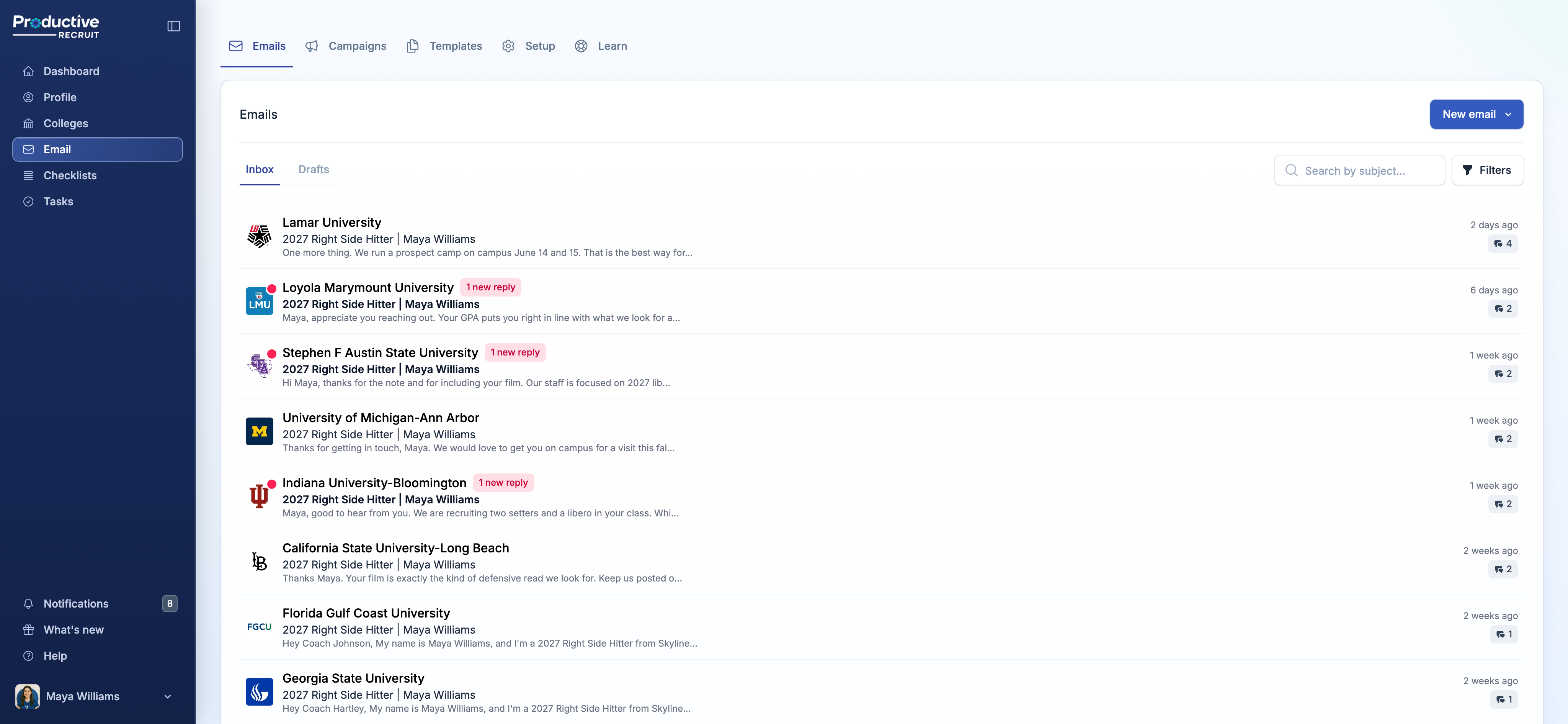
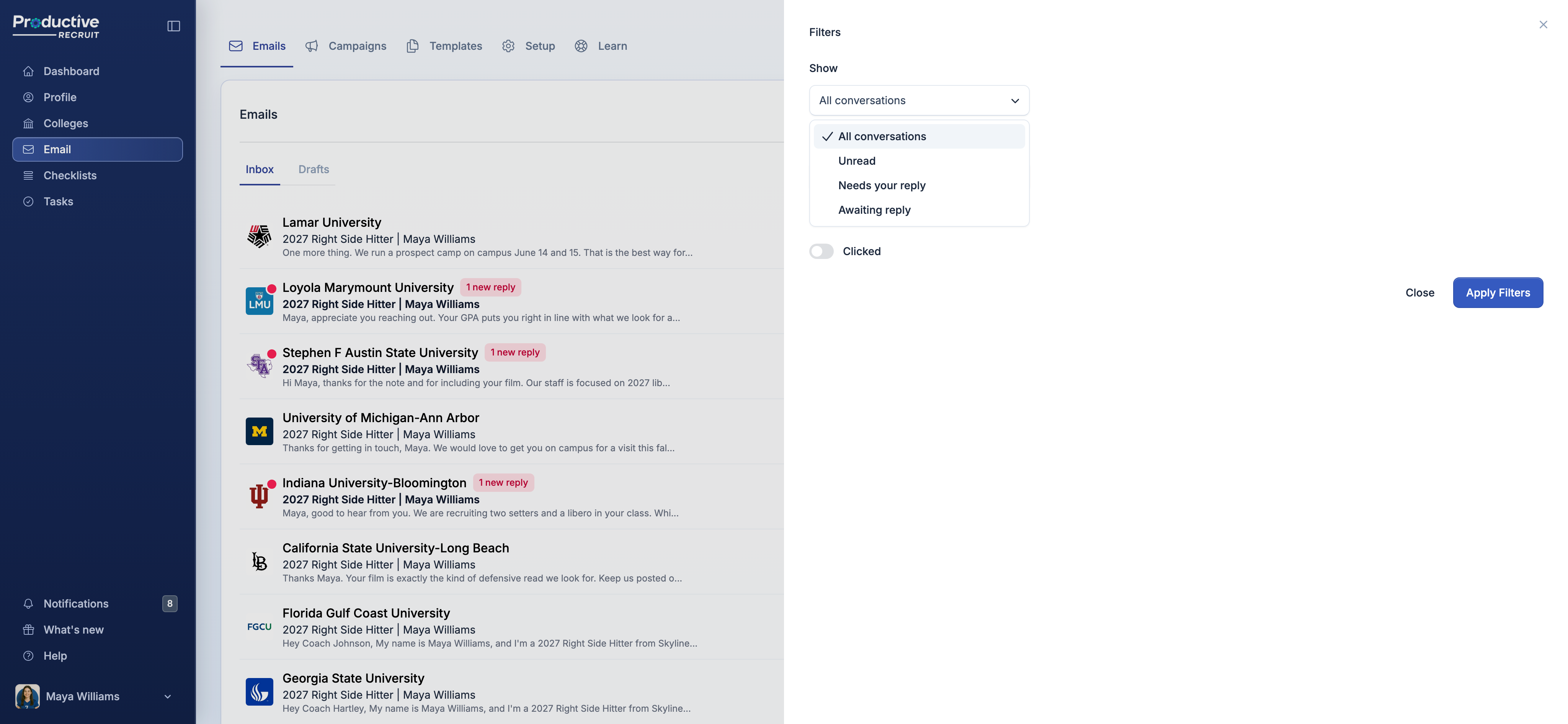
Your emails page groups everything into conversations, sorted by whatever happened most recently. Three filters do the actual work:
- Unread, a coach message you have not opened yet.
- Needs your reply, the coach spoke last. This is the list you work through first.
- Awaiting reply, you spoke last and have not heard back. This is your follow-up list.
That second one changes how the whole thing feels. Instead of scrolling your personal inbox trying to remember who you owe an answer, you open one list and it is right there.
You can also narrow to a single program, or to conversations where your email was opened or a link was clicked, so the coach who opened your email four times and then replied is easy to find.
Reply without leaving
Open a conversation and you get the full exchange in order, your sends and the coach's replies together. Long quoted text collapses so you are reading the new message. Attachments on either side download right from the thread.
Hit Reply and write back in place. It goes out from the same address you have been sending from and lands in the coach's existing conversation rather than starting a new one, which is how coaches prefer it. You get the same tools as the main composer: your saved templates, up to three attachments, save as draft, and a test copy to yourself if you want to see it first.
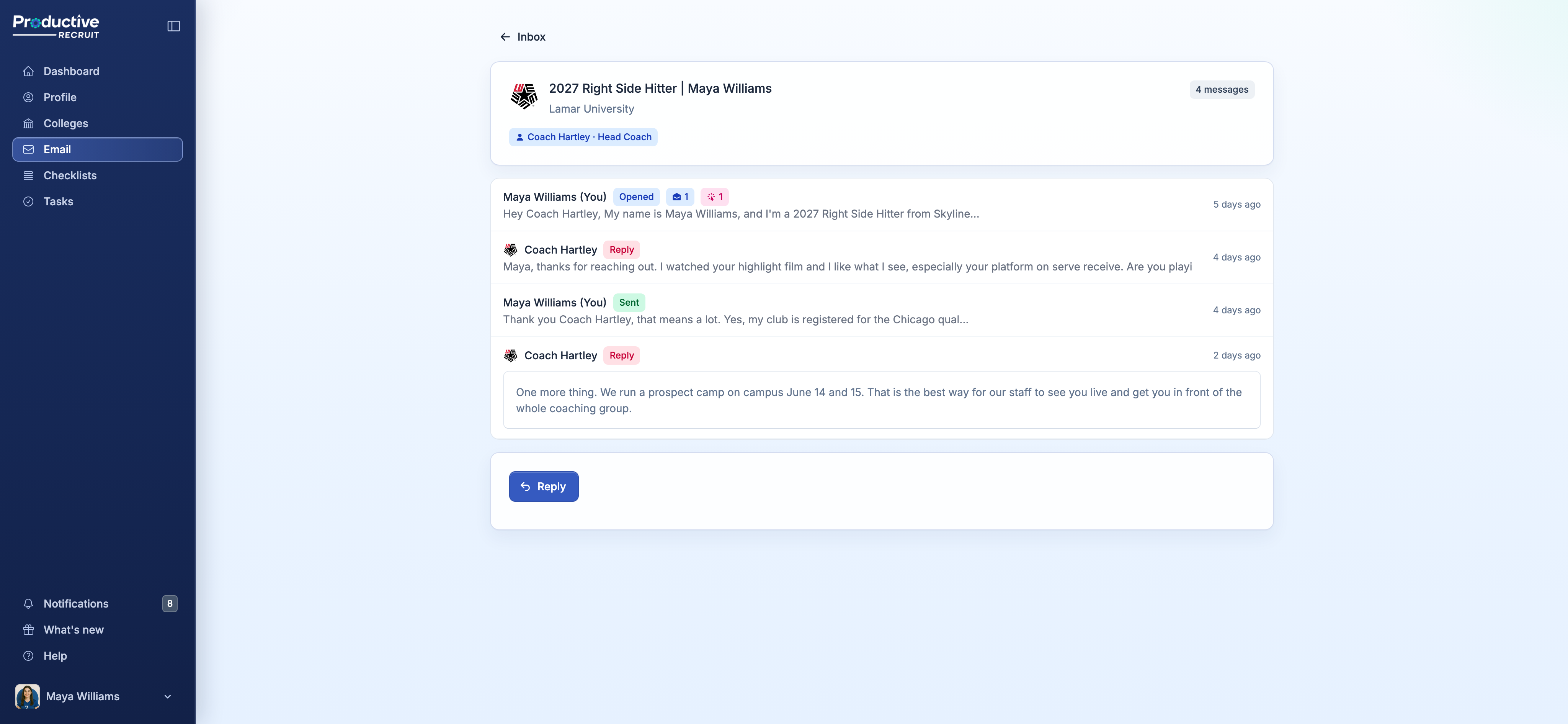
One nice side effect: a reply you send from inside the app carries open and click tracking, same as your original email. Send that reply from Gmail instead and the coach still gets it, you just will not see whether they opened it.
If you connected Gmail a while back, we will ask you to reconnect
Worth knowing before you go looking for the switch. When you first connected Gmail, you gave ProductiveRecruit permission to send email as you, and that is all. Reading replies needs a separate permission, and Google will not hand it over quietly in the background. So the first time you turn on Reply Tracking, Google will walk you through a quick consent screen.
It takes a few seconds and you only do it once. We ask for read access and nothing more. We never send on your behalf without you hitting send, and we never touch anything in your Gmail.
A few things to know
Your past outreach is already in there, read-only. Every email you have sent through ProductiveRecruit is grouped into a conversation, so your inbox is not empty on day one. The older ones predate the identifiers that match a reply back to the message it answers, so they cannot pick up a tracked reply and show no reply box. Everything you send from here on is fully live. There is more on those older conversations in Replies & email threads.
Tracking starts when you turn it on. It does not reach back and fetch replies that arrived before you flipped the switch.
It is off until you switch it on. Every account, including a Gmail account you connected five minutes ago. Nothing turns itself on.
If you send from a ProductiveRecruit address instead of your own Gmail, one thing genuinely changes. Right now, replies to your @prodrecruit.com address get forwarded to your personal inbox. With tracking on, a reply that matches one of your conversations lives in ProductiveRecruit and stops being forwarded. Anything that does not match a conversation still forwards to you like it always has.
Turn it on
Head to your email setup, flip on Reply Tracking, and send your next batch. The full details, including what counts as a real reply and what happens with older conversations, are in Replies & email threads.
As always, hit reply if something looks off or you have an idea for what we should build next.
— Colin


Ready to start your recruiting journey?
Join 25,000+ athletes using ProductiveRecruit to connect with college coaches.