

ProductiveRecruit March 2026 Product Update
This month we added outreach and engagement tracking for organization admins, a usage tab to monitor plan limits, group invite links for faster athlete onboarding, auto-generated introduction email templates, and new template tags for more personalized coach outreach.

Colin McAtee
Founder

This month we focused on giving organizations better visibility into their athletes' recruiting efforts and helping athletes start their outreach faster.
Here's what's new.
New Admin Dashboard with Outreach & Engagement Tracking
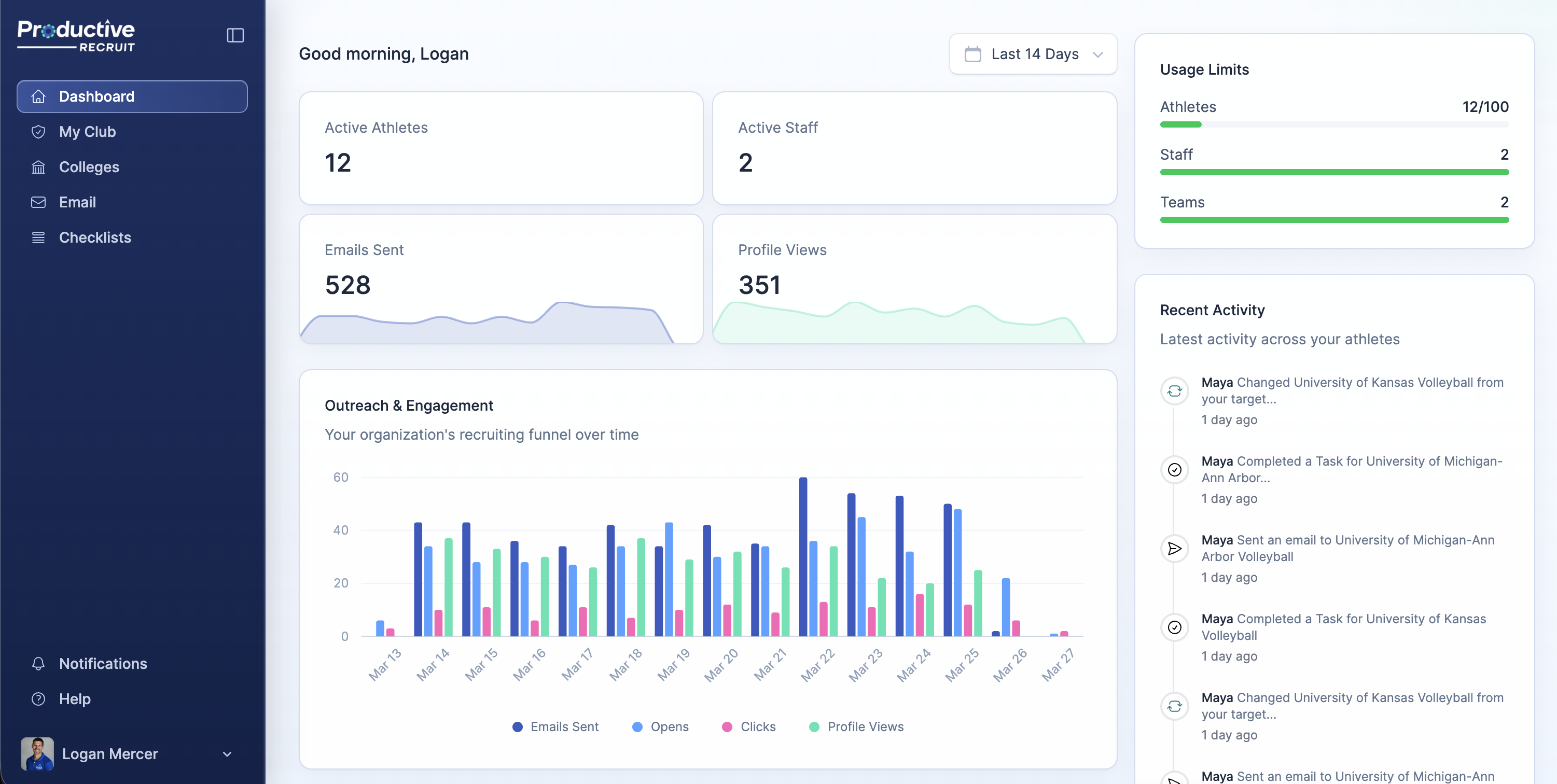
Organization admins now land on a new dashboard that includes an Outreach & Engagement chart tracking email sends, opens, and clicks over time. If you're managing a roster of athletes, you can now see at a glance whether their outreach is actually getting traction — who's sending, what's getting opened, and what's generating clicks.
The dashboard also includes org-level stats, a getting-started checklist for new admins, quick action shortcuts, and a recent activity timeline.
Usage Tab for Organizations
We added a Usage tab to your space navigation that shows capacity gauges for your current plan. Admins can now see exactly how many athlete seats, admin seats, and emails they've used relative to their limits — no guessing, no surprises when you're approaching a threshold.
Improved Athlete Invites with Group Invite Links
The invite athlete modal now gives coaches and admins two clear options: share a group invite link or add an athlete manually via email. The group invite link is the faster path when you're onboarding a full roster — share one link and let athletes sign themselves up rather than entering emails one by one.
Auto-Generated Introduction Email for Athletes
When athletes finish onboarding, they now have a ready-to-send Introduction Email template waiting for them. No more staring at a blank page trying to figure out what to write.
The template is tailored to your sport — if you play a club sport, it pulls in your club team name. If you play a high school sport, it uses your high school. You can customize it from there, but the starting point is already done.
New Email Template Tags
We added three new tags you can use in any email template:
{{user.club_team}}— inserts your club team name{{user.high_school}}— inserts your high school name{{user.profile_url}}— inserts a link to your recruiting profile
These make it easier to personalize your outreach at scale without manually editing each email.
That's it for March. Questions or feedback? We'd love to hear from you.
— Colin



Ready to start your recruiting journey?
Join 25,000+ athletes using ProductiveRecruit to connect with college coaches.