

ProductiveRecruit August 2026 Product Update
Clubs can now put live team rosters on their own website, in their own colors. Athletes got a bigger target list toolkit: bulk add from college search, clearer statuses, and a tab per sport. Plus calendar schedule imports, self-serve sport changes, and coach replies right inside ProductiveRecruit.

Colin McAtee
Founder
August was a big month on both sides of the app. Clubs and schools can now put live team rosters on their own website, in their own colors. Athletes got a much bigger target list toolkit. And coach replies now land inside ProductiveRecruit, which got its own post earlier in the month.
Your rosters, on your own website
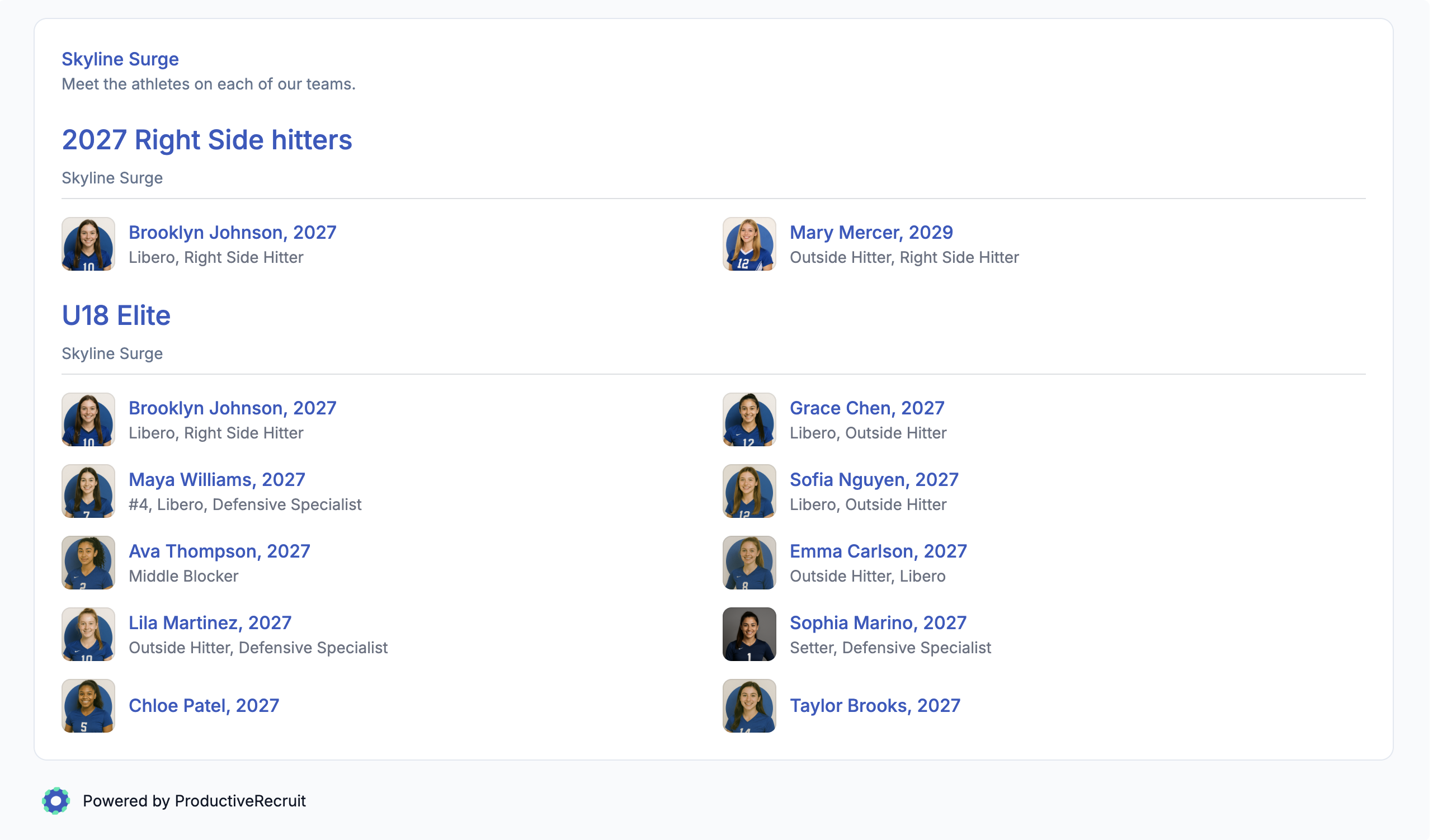
Every club has a website, and most of them have a roster page that is out of date. Website Integrations now fixes that. The new Teams tab generates an embed snippet that renders your team rosters on your own site, straight from ProductiveRecruit. Pick one team for a single-team page, or leave the selection empty to show every roster under its own heading. Each player links to their full recruiting profile, so a college coach browsing your site is one click away from an athlete's profile.
Rosters follow the display order you set on each team, and only athletes marked to show on the team profile appear. Update a roster in ProductiveRecruit and your website updates with it.
Every widget, including the existing Athlete Search and Commitments embeds, now takes a Custom accent color. Check the box on the Website Integrations page, paste your brand's hex code, and headings, links, and buttons match your site. Embed codes are now click-to-copy cards with a Preview button, so you can see exactly what will render before you paste anything.
Setup steps are in the Website Integrations docs.
Your target list grew up
Four upgrades to how you build and manage your list:
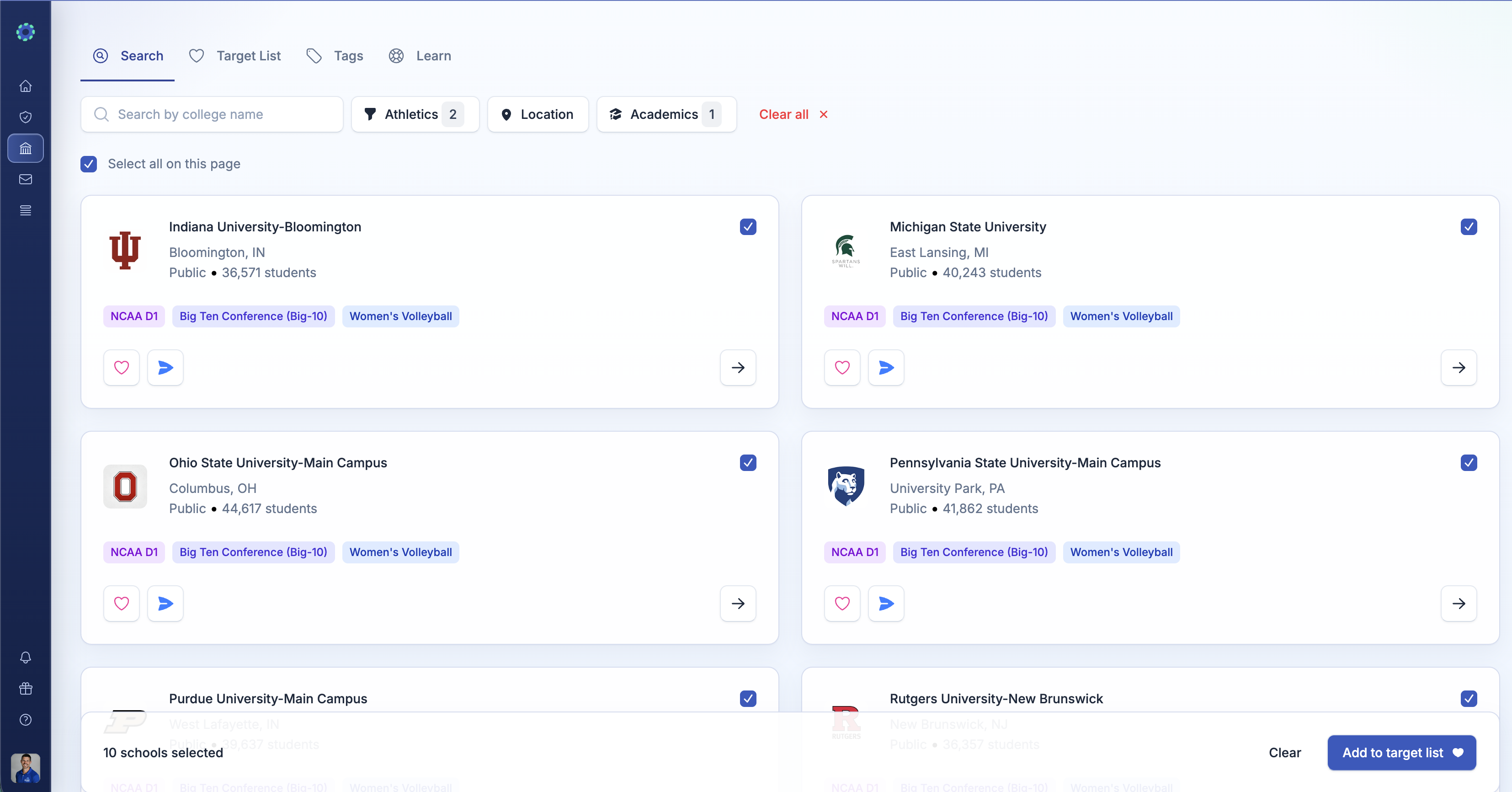
- Bulk add from college search. Every result card now has a checkbox, plus Select all on this page above the grid. Select the schools you want, click Add to target list in the bar at the bottom, pick one status and up to three tags for the whole batch, and confirm. Schools already on your list are skipped automatically.
- Statuses explain themselves. Every status dropdown in the app now shows each status's color and a one-line description, so you never have to guess whether a school belongs in "In Contact" or "Initial Contact Sent."
- Not Interested now says whose call it was. The two closing statuses are Not Interested (Me) and Not Interested (School), so your list records whether you passed on a program or the program passed on you. Your activity history updates too.
- Dual-sport athletes get a tab per sport. If you run two profiles, your target list now splits into a tab for each sport, each with its own hand-ranked order. No more scanning a mixed list to figure out which schools belong to which profile.
Change your sport without emailing us
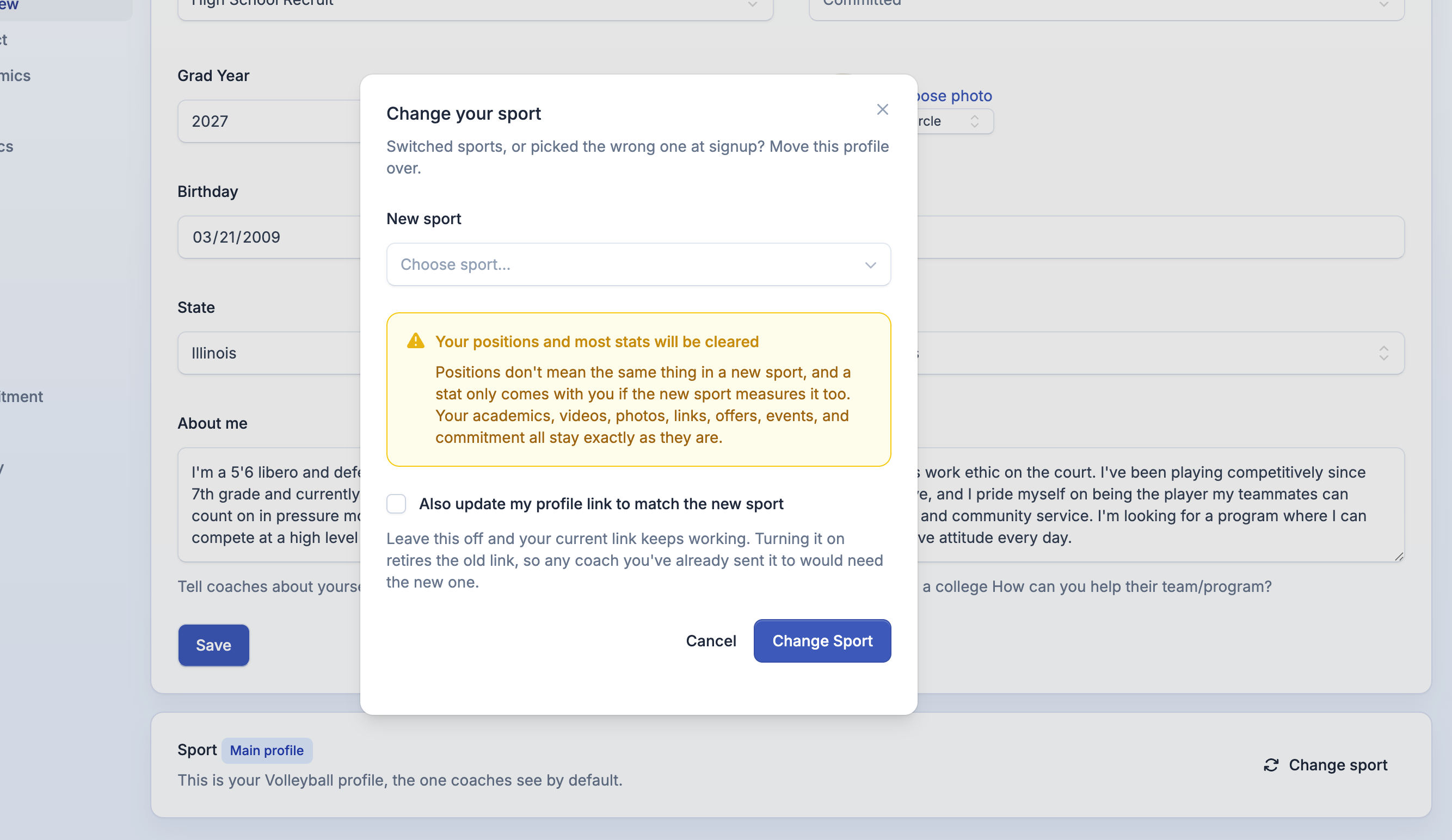
Picked the wrong sport at signup, or switched sports for real? You can now fix it yourself. The Overview page in your profile editor has a Sport card with a Change sport button. Stats that exist in both sports, like vertical jump or wingspan, carry over. Sport-specific positions and stats are cleared so nothing strange shows up on your new profile. Your profile link stays the same by default, because it is already in every email you have sent.
If you run two profiles, they are now labeled Main and Second, and Make this my main profile swaps them in one click. Main is the profile your email template variables, college search, and dashboard read from, so it matters which one it is.
Schedule import takes calendar exports
The Import Schedule button on your Events page, and on team schedules for clubs, now accepts .ics calendar files alongside CSVs, PDFs, and photos. If your club runs its season in PlayMetrics, TeamSnap, or a Google or Apple calendar, export the calendar and upload it. AI reads every event into the same review table as before, you confirm, and your season is on your profile.
Team profile pages also now lead with upcoming events and tuck past ones behind a toggle, the same way the athlete profile has since July.
More for clubs and schools
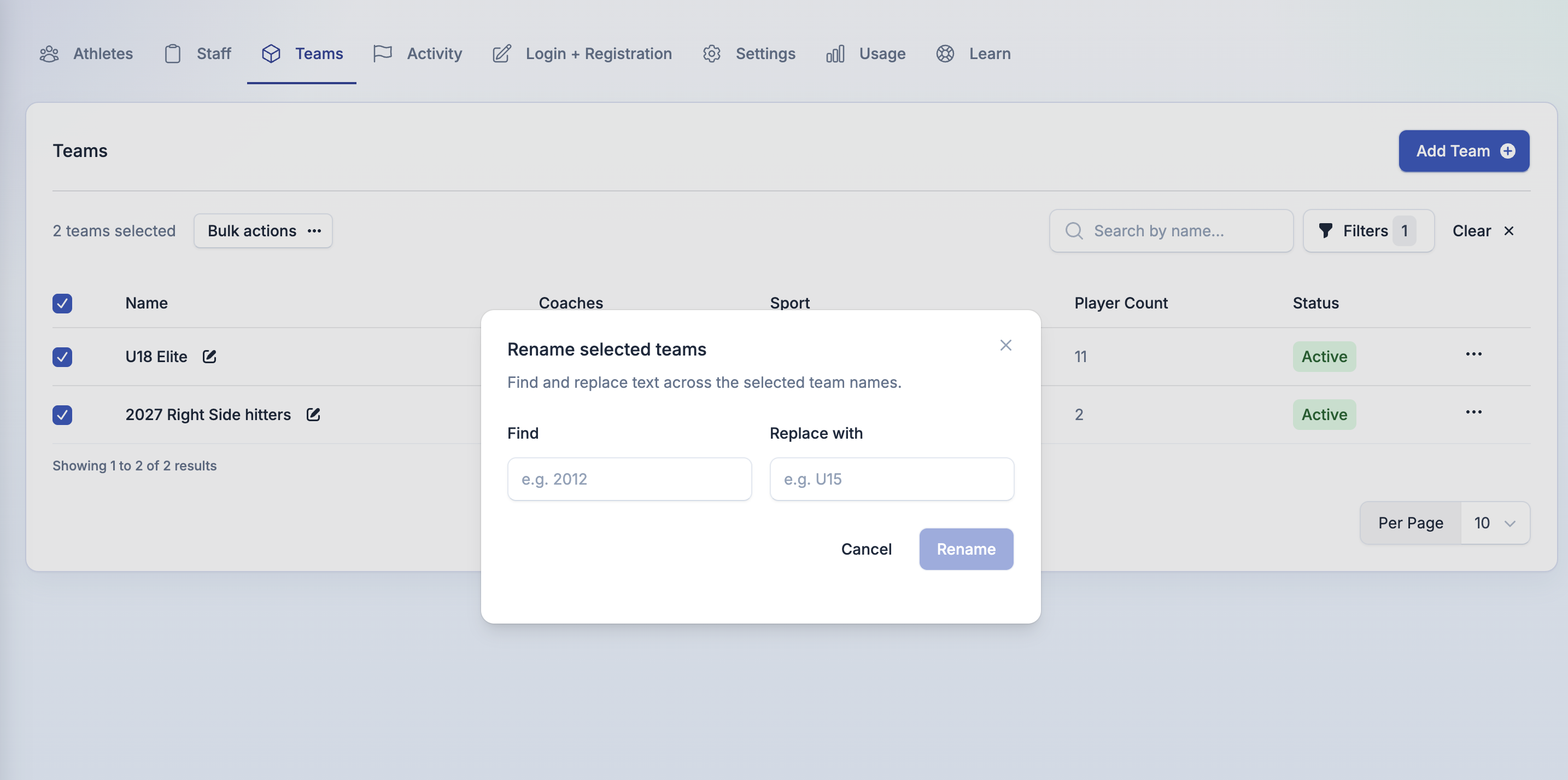
- Bulk team rename. US Soccer's move to school-year age groups means renaming every team this preseason. Select teams on the Teams page, open Bulk actions, choose Rename, and find and replace across all of them with a live preview before you commit. For one-off fixes, every team name has a pencil icon for renaming right in the list.
- Archive and convert in one step. When an athlete leaves your club, the archive modal now offers Convert this athlete's account to a personal account and Email the athlete about the change. They keep their profile, target list, activity, and email history on an account they control, and you free up the seat. Both options are opt-in, and they work in bulk and when archiving a whole team.
- Filter to uncommitted athletes. The athlete list's Commitment filter now has three options: All, Committed, and Uncommitted. Building a roster of uncommitted 2027 grads is now a filter, not a spreadsheet.
- See your athletes' coach conversations. Coaches and admins can open an athlete's email thread from the activity feed and read the full conversation, view-only. Only the athlete can reply.
In case you missed it
Coach replies, right inside ProductiveRecruit. Reply tracking went live to everyone on August 13. Flip on Track replies in your email setup and coach responses land in your ProductiveRecruit inbox, threaded into a conversation with everything you sent that program, with a Needs your reply list so you always know who is waiting on you. If you connected Gmail a while back, you will go through a quick Google consent screen the first time you turn it on. Read the full launch post.
The engagement score launched this week. Every program you email now has a score built from what its coaches actually did with your outreach, and your schools are ranked by it on the new Engagement page. It shows on your dashboard and your target list too. Here is how it works.
Also in August
- The email thread view now shows each coach's email address next to their name, so you can see exactly which address the conversation went to.
- The email composer works properly on phones again. The toolbar and the Send button no longer run off the edge of the screen.
- If you marked a school Committed or Signed from your target list, your public profile now shows the commitment. A bug had it reading as still Searching. Fixed, and every affected profile was corrected.
- Org athletes who hit the daily send limit in a campaign now see the daily limit, not an upgrade prompt.
- The Learn links across the app now open the matching docs section instead of a single article.
That's it for August. Reply if something looks off or you've got an idea for what we should build next.
— Colin


Ready to start your recruiting journey?
Join 25,000+ athletes using ProductiveRecruit to connect with college coaches.