

See Which College Programs Are Engaging With Your Athletes
Clubs, high schools, and recruiting services can now see which college programs are engaging with their athletes, ranked by how many athletes each program clicked, viewed, or replied to. Here's how the new Engagement page works and how to use it.

Colin McAtee
Founder

Your athletes are emailing college coaches all season. The question that comes next is the one families ask you: is anyone paying attention?
Starting today, the Engagement page answers it for your whole organization. Clubs, high schools, and recruiting services can see which college programs are engaging with their athletes, ranked by how many athletes each program has clicked, viewed, or replied to.
Where to find it
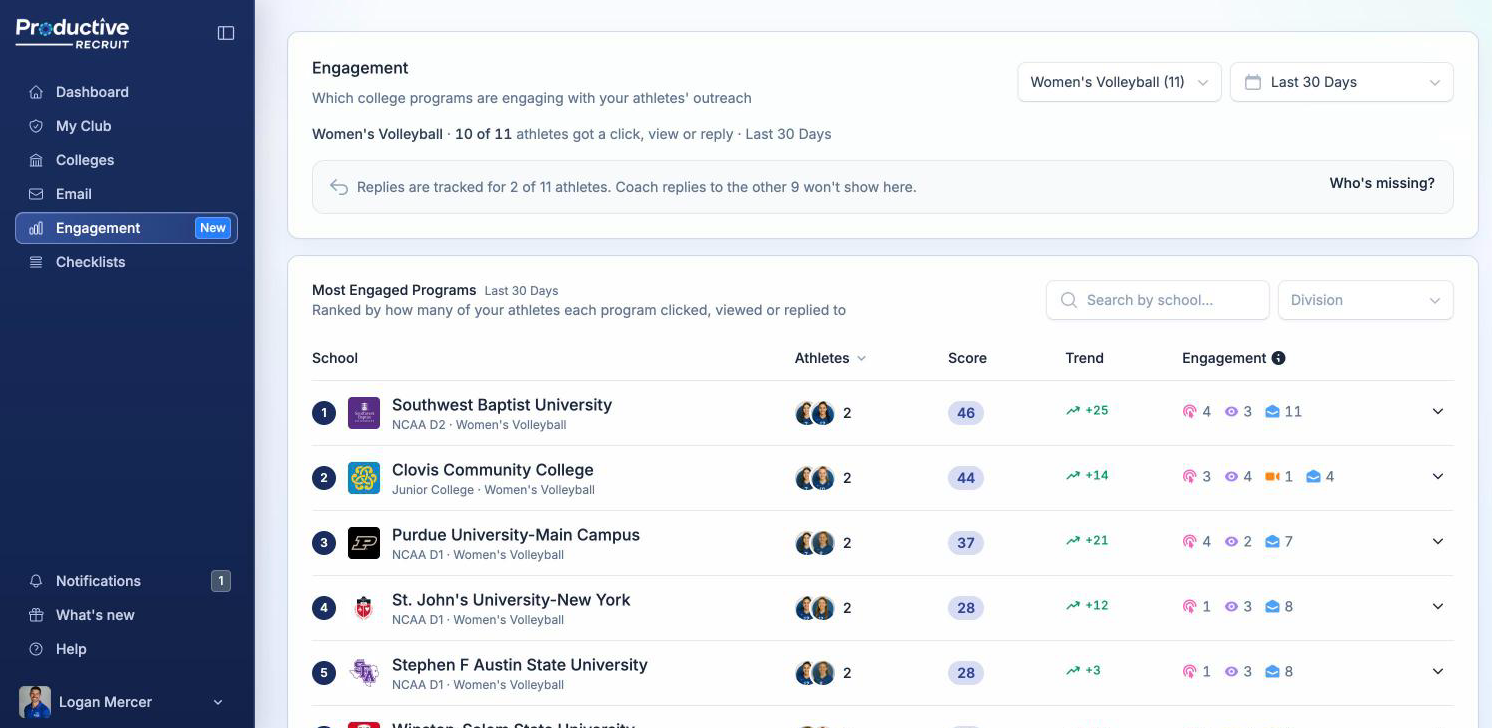
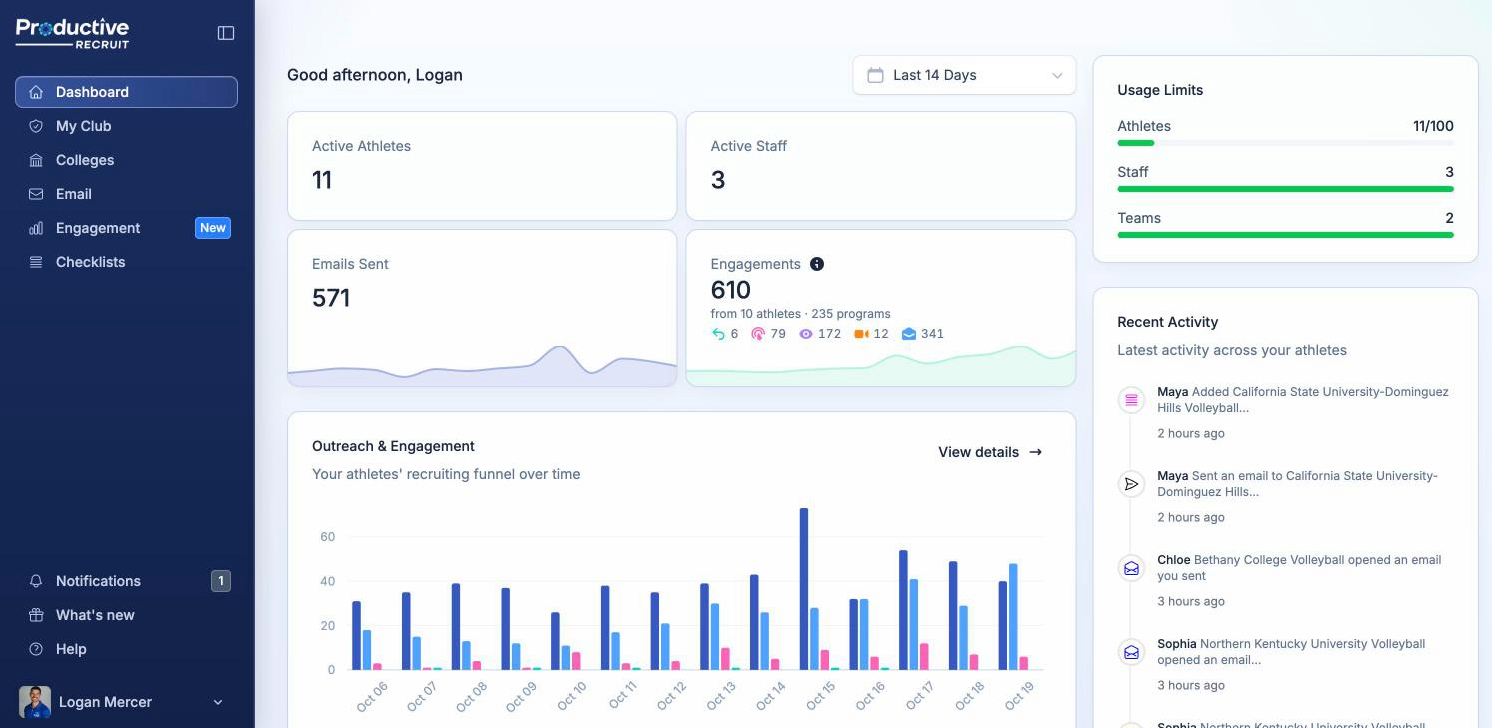
Super Admins, Admins, and Coaches will see a new Engagement item in the sidebar. You can also get there from View details on the Outreach & Engagement chart on your admin dashboard.
Ranked by athletes reached
A program that opens forty emails from one athlete is a different story than a program that clicked through to five of your athletes. So Most Engaged Programs is ranked by athletes reached: how many of your athletes a program clicked a link for, viewed the profile or video of, or replied to.
Opens don't count toward that number. Email apps and security scanners can trigger an open without a coach reading anything, so an open alone doesn't move a program up the list. Opens still add a point each to the score, so you don't lose them.
Each row shows:
- Athletes: the athletes' photos and how many were reached, plus how many got a reply and how many more only had their email opened, like "2 replied · +3 opened"
- Score: the program's engagement score across all of your athletes
- Trend: how that score compares to the previous period
- Engagement: an icon chip for each kind of signal: replies, clicks, profile views, video views, and opens
Prefer a different view? Sort by Score to put the most engaged programs on top, or by Trend to find the ones heating up.
The score your athletes already know
The score uses the same weights as the athlete Engagement score: a reply is worth 15, a click, profile view, or video view is 5, and an open is 1. A program's score is just that number added up across every one of your athletes.
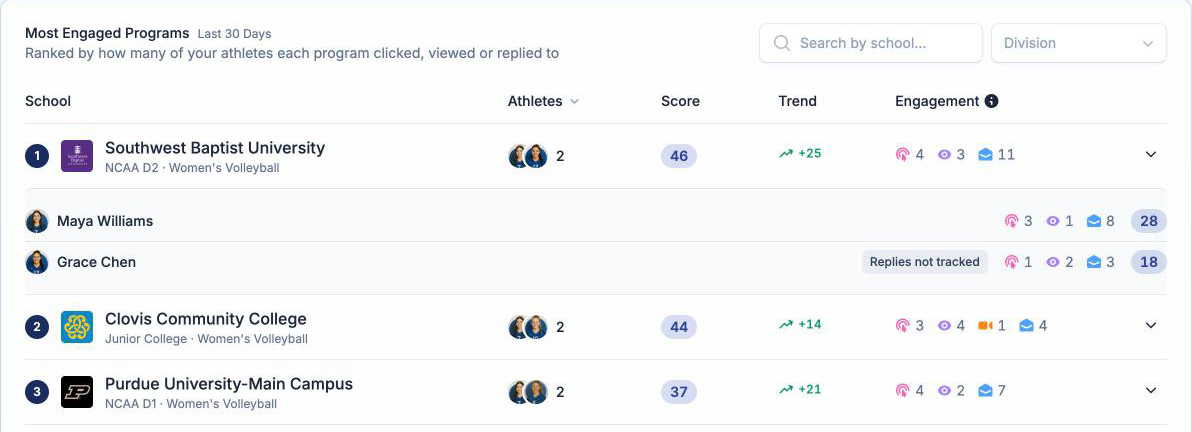
Open a program to see the athletes
Click any program and it opens up to show exactly which of your athletes it engaged with, each with their own signal chips and score. The athletes' scores add up to the program's.
Filter to what you care about
- Sport: organizations are multi-sport and programs aren't, so pick a sport. The page starts on the one with the most athletes.
- Club: if your organization has several clubs, look at all of them or pick one.
- Date range: the last 30 days by default, all the way out to all time.
- School search and division: jump to a specific program, or compare D1 against D1.
At the top, one line tells you how far your athletes' outreach is getting, like "18 of 24 athletes got a click, view or reply · Last 30 days."
Honest about replies
Replies are the strongest signal, but they only count for athletes who've turned on reply tracking. The page tells you how many have, like "Replies are tracked for 21 of 24 athletes," and the Who's missing? button lists the rest. That's your nudge list. It takes an athlete about a minute to turn on.
Who sees what
The Engagement page follows the same rules as your admin dashboard:
- Super Admins see every athlete in the account
- Admins see the athletes in their spaces
- Coaches restricted to their own teams see only those athletes, and the page labels it "Your teams"
Only athletes are counted. Emails your staff send from their own accounts stay out of the numbers.
Your admin dashboard got an update too
The Profile Views tile is now Engagements: every action coaches took on your athletes' emails, "from N athletes · M programs," with a chip for each kind of signal. On the Outreach & Engagement chart, the Profile Views line is now Replies. And Emails Sent and Engagements now count athletes only.
Three ways to use it this week
- Show your families who's paying attention. A program engaging with several of your athletes is interested in your organization, not just one player. That's worth sharing at your next parent meeting.
- Check a program before a showcase or a call. Open it up and you'll know which of your athletes that coach has already looked at, and who they've replied to.
- Work the Who's missing? list. Every athlete who turns on reply tracking makes the page more complete.
If the table looks thin, widen the date range. Engagement is sparse, and the last 3 months or all time usually tells a fuller story.
See it
Already on ProductiveRecruit? Click Engagement in your sidebar. The full walkthrough is in Which programs are engaging with your athletes.
Run a club, high school, or recruiting service and want to see it with your own roster in mind? Book a demo.
As always, hit reply if something looks off or you have an idea for what we should build next.
Colin



Ready to start your recruiting journey?
Join 25,000+ athletes using ProductiveRecruit to connect with college coaches.