

Roster needs narrows College Search to the programs likely to need your position in your class. We read the class years on each program's current roster and count how many players at your position graduate before you arrive. Programs where at least one does stay in your results, and each one gets a High, Medium, or Low outlook that says how strong the opening is.
It's built from roster class years, not from coaches' recruiting plans, so think of it as a forecast. It's also not limited to the programs whose coaches posted their needs: you get an outlook for every program we have a current roster for.
Roster needs currently covers 11 sports: men's and women's soccer, women's and men's volleyball, men's and women's basketball, men's and women's lacrosse, football, baseball, and softball. See Which sports are covered.
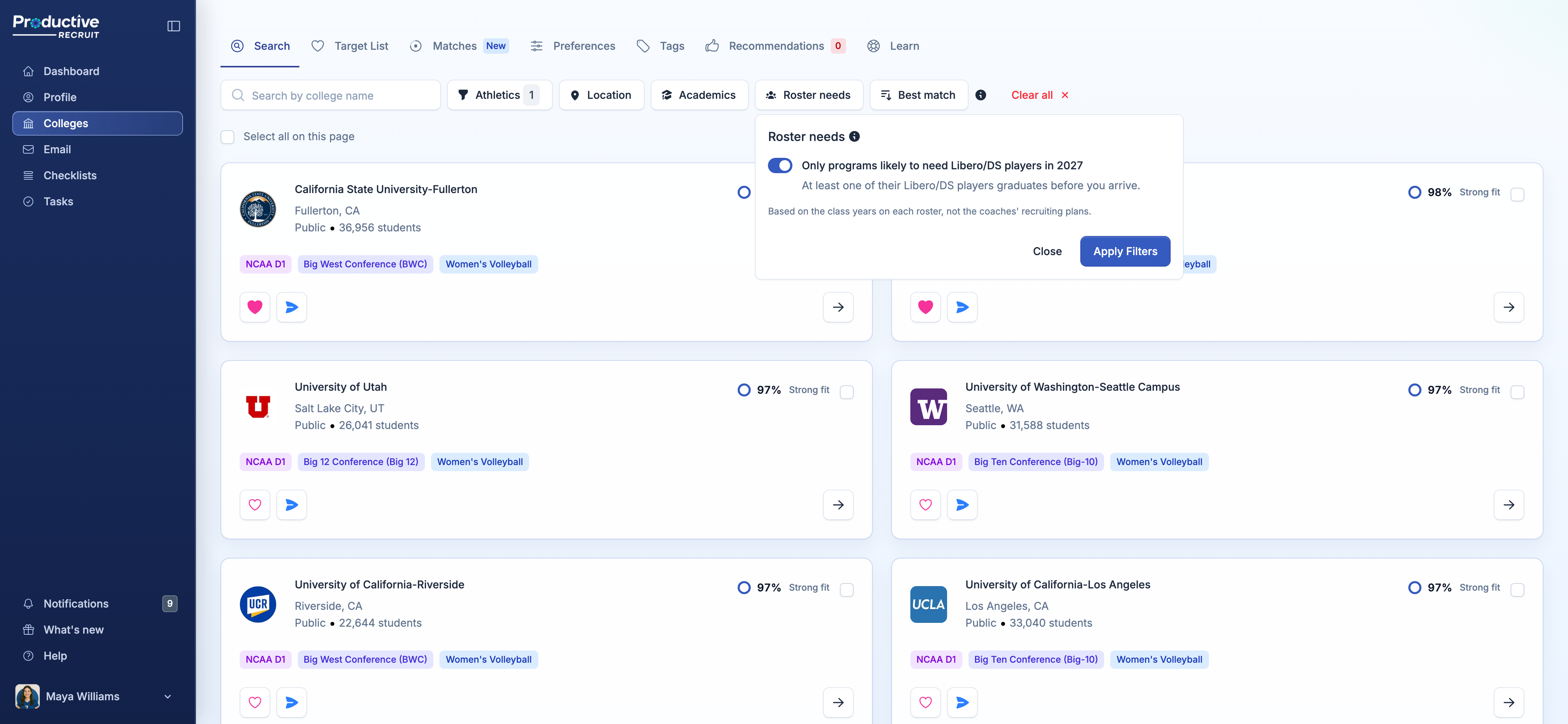
Turn it on
In College Search, click Roster needs, next to Athletics, Location, and Academics. Your position and grad year come from your profile for the sport you're searching, so the switch reads something like Only programs likely to need Libero/DS players in 2027, with "At least one of their Libero/DS players graduates before you arrive" underneath. Turn it on and click Apply Filters.
While it's on, the button shows a count badge, and a line under the filters spells out what's applied: "Roster needs: Libero/DS, class of 2027. Only programs with roster data." Every other filter still applies, so you can stack it with a division, a state, or your majors. It's saved with your other search filters, so it stays on until you clear it, either with Clear Roster Needs in the popover or Clear all.
Programs we don't have a roster for drop out while it's on. If a search comes back empty, loosen your other filters first. A program that doesn't show up may still be recruiting your position.
High, Medium, and Low
The filter keeps every program where someone at your position leaves. The outlook then says how strong that opening is, by comparing how many leave with what a typical roster would lose:
- High: at least one more player at your position leaves than a typical roster would lose (a quarter more for big groups, like a football line).
- Medium: about as many leave as usual.
- Low: someone leaves, but at least one fewer than usual.
Why "at least one leaving"
You might expect the filter to keep only High and Medium. That would get two kinds of program wrong:
- Small groups losing nobody. A program with two liberos, neither leaving, counts as Medium, since a typical two-player group only loses about half a player before the next class arrives. There's no spot opening up there.
- Big groups still losing someone. A program losing 1 of its 8 outside hitters, when about 2 is normal, counts as Low. But that's still a spot to fill.
Keeping every program where at least one player leaves fixes both, and returns about the same number of results. It also means every program in your results passes a plain test: someone at your position graduates before you get there.
The chips on each card
In your results, every program where someone at your position leaves gets a chip, colored by its outlook: a green High roster opportunity, an amber Medium roster opportunity, or a grey Low roster opportunity. Programs where nobody at your position leaves, and programs with no roster data, show no chip.
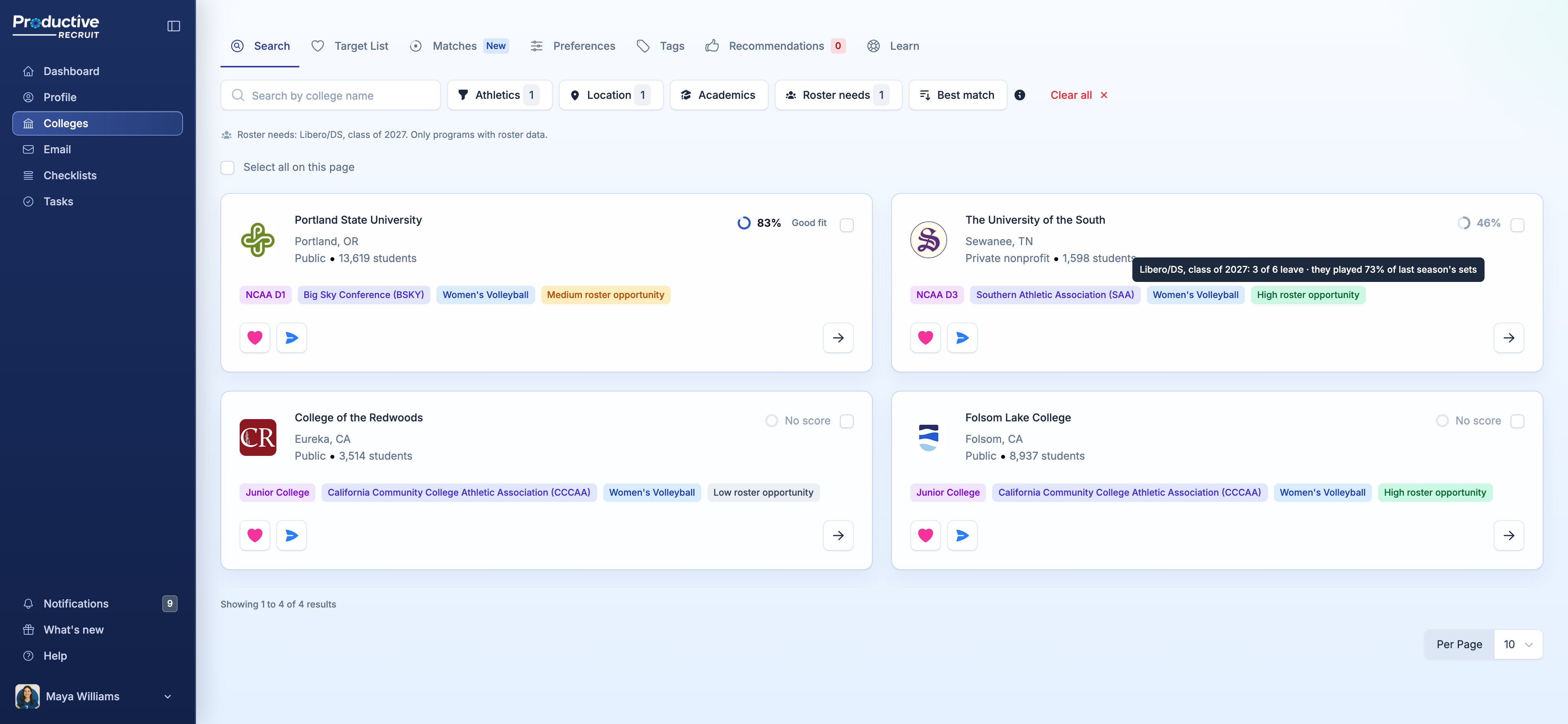
Hover a chip for the numbers behind it, for example "Libero/DS, class of 2027: 3 of 6 leave · they played 73% of last season's sets." That's how many players at your position graduate before you arrive, out of how many are on the roster, and how much of last season's playing time those players had. One player leaving can be most of the playing time, or almost none of it.
You'll see the chips even with the filter off, the same way your match % shows on every card. Search with Roster needs off to see every program, and use the chips to spot the ones worth a closer look.
How the outlook works
Click the ⓘ next to the Roster needs heading any time for the short version.

We count the players at your position whose last season ends before your class arrives. A player's last season is their senior year (sophomore year at junior colleges), and grad students and 5th years are already in theirs. Then we compare that with what a roster spread evenly across its classes would lose in the same time: about a quarter of the group each year, or half at junior colleges.
A few details:
- Positions are grouped the way rosters list them. Most soccer rosters only say GK, D, M, or F, so a center back and an outside back both count as Defenders. Players listed at two positions, like D/M, count in both.
- Playing time is last season's. It uses minutes in soccer and basketball, sets in volleyball, starts in football and lacrosse, and at-bats or innings pitched in baseball and softball. Only players who played there last season count, so freshmen and transfers in don't. It's left out when we have stats for fewer than half the position.
- Outlooks cover the next three classes: the class arriving next fall and the two after it. Junior colleges only cover the next class, since their players stay two years.
Outlooks update as rosters do, so a program's outlook can change when it posts a new roster.
What it doesn't know
- Redshirts, transfers, and early departures. The outlook goes by class year alone, so a player who redshirts, transfers out, or leaves early isn't predicted.
- Commits. Recruits a program has already committed for your class aren't counted.
- The coaches' plans. A program can be set at your position on paper and still recruit it, or the other way around.
Use the outlook to decide where to look first, not to rule a school out. If a program you love shows Low, email the coach anyway.
On a program page
Every program page in a covered sport has a Roster Outlook section with the same outlook in more detail: how many players at your position graduate before you arrive, who'll still be there in your freshman year, and openings at every position for each of the next three classes. Search and the program page read the same outlook, so they always agree.
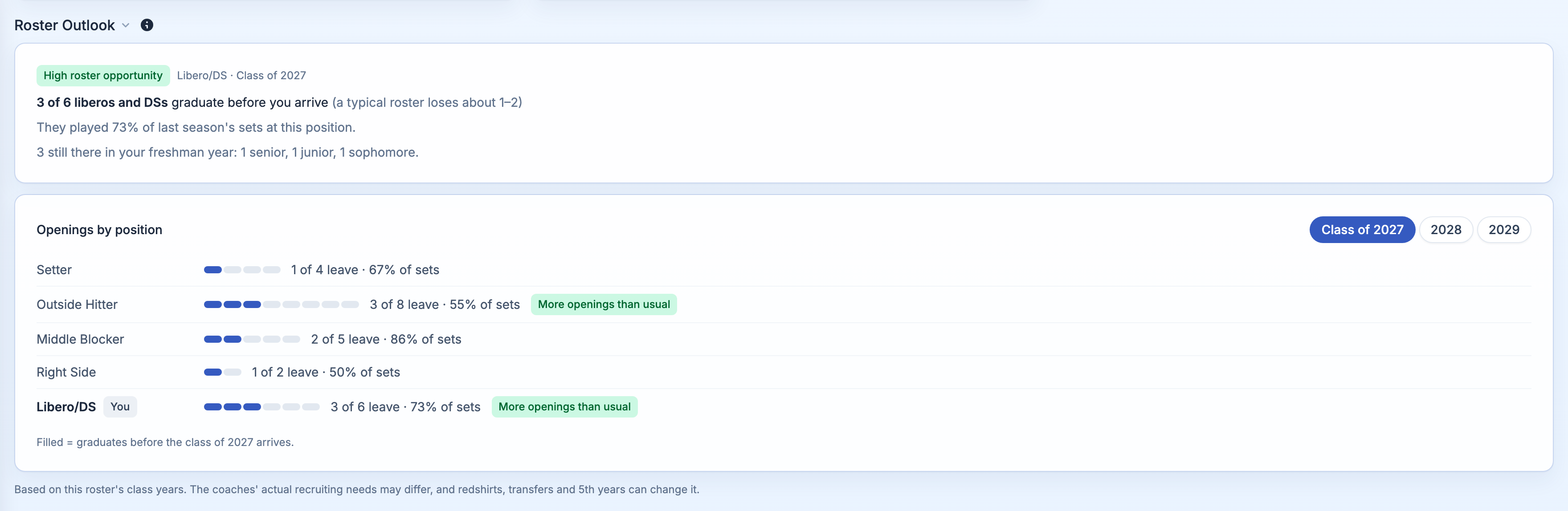
See College program profile pages for a walkthrough of that section.
Your position and class
The filter needs a position and grad year on your profile. When something's missing, the popover tells you what and fixes it in place:
- No position or grad year: click Add your position (or Add your grad year) to go straight to that spot in your profile. Save, come back, and the switch is ready.
- ATH and similar positions: rosters don't list ATH as its own position, so there's no outlook for it. Pick the position you'd most likely play in college as your primary position to use the filter.
- A class too far out: outlooks only cover the next three classes, so a younger athlete sees "The class of 2031 is too far out to forecast," with the classes that are covered. Check back as your class gets closer.
If you have a second profile, Roster needs uses the position and grad year from the profile for whichever sport you're searching.
For coaches and staff
If you're on staff at a club, high school, or recruiting service, Roster needs works for any position and class. Select one sport under Athletics first, since positions are different in every sport. Then open Roster needs, pick a Position and Class of, turn on Only programs likely to need this position for this class (at least one player at the position graduates before the class arrives), and click Apply Filters. The chips on each card follow the position and class you picked.
On a program page, staff see Openings by position for every position and class. See College program profile pages.
Which sports are covered
Roster needs currently covers these 11 sports:
- Men's soccer and women's soccer
- Women's volleyball and men's volleyball
- Men's basketball and women's basketball
- Men's lacrosse and women's lacrosse
- Football
- Baseball
- Softball
Within those sports, it covers programs in NCAA D1, D2, and D3, NAIA, and junior colleges, wherever we have a current roster for the program. A program without one doesn't get an outlook and drops out while the filter is on.
Other sports don't have roster data yet, so athletes in them won't see the Roster needs button, and their program pages don't show the season records, roster, or Roster Outlook. We're adding sports over time. If yours isn't covered, email [email protected] so we know you want it.
Roster needs is a Pro feature, available during your trial and on a paid plan. See Choosing the right plan.
What's next
- See the full Roster Outlook, the roster, and season records on any school in College program profile pages.
- Rank programs by how well they fit what you want in College matches.
- Learn every other filter in College search & filters.